


September 2026
Announcing Rsdoctor 2.0
We are excited to announce Rsdoctor 2.0! 🎉
Starting with 2.0, Rsdoctor is fully focused on Rspack. webpack projects can continue using Rsdoctor 1.x. This focus allows Rsdoctor to integrate more deeply with Rspack's built-in capabilities and continue tailoring analysis to its build model and ecosystem.
Build analysis data also moves beyond the report UI: developers can investigate issues visually, while coding agents and automation can query the same data directly. Rsdoctor 2.0 also brings faster analysis, broader compiler support, and a smaller installation footprint.
Highlights in this release include:
- Faster analysis with Rspack: Rsdoctor 2.0 is fully focused on Rspack, and expensive data processing runs inside Rspack. When introduced as an option in 1.0, this reduced overall analysis time by more than 20%. In 2.0, it is always enabled and avoids repeated work such as stats conversion.
- Build analysis for agents: Agent CLI and the Rsdoctor analysis skill let coding agents query build data and return actionable optimization suggestions.
- One report for every compiler: The regular Rspack plugin automatically handles multi-compiler builds, Rsbuild environments, and child compilers while keeping their data isolated.
- A smaller installation footprint: Core capabilities are consolidated into
@rsdoctor/core, reducing the repository from 13 packages to 6 and the complete production installation footprint by 48.5%. - Faster rebuild analysis: Loader caching, fewer unnecessary calculations, and faster report writes reduce median HMR time by about 47% in the benchmark.
Deeper and faster Rspack analysis
Rsdoctor 1.x supported both Rspack and webpack, so some analysis capabilities had to rely on data that both bundlers could provide. By focusing on Rspack in 2.0, Rsdoctor can reuse more of Rspack's internal data and evolve alongside its build model and capabilities.
The Rspack native plugin started as an optional performance optimization in Rsdoctor 1.x. It moved expensive data processing into Rust inside Rspack, reducing overall analysis time by more than 20% in large-project testing for Rsdoctor 1.0. Rsdoctor 2.0 enables this capability by default.
Rspack now provides module and chunk graphs directly instead of sending them through stats conversion. Resolver analysis reuses Rspack's internal resolver data, while side-effect source code is collected only when tree-shaking analysis needs it. These changes reduce data conversion and repeated processing in JavaScript.
Projects no longer need experiments.enableNativePlugin. Remove the option when upgrading to 2.0.
Build analysis for agents
Rsdoctor reports contain detailed information about assets, modules, packages, loaders, and tree shaking. For a large project, finding an answer can still require moving between several pages and combining multiple dimensions of data manually.
Agent CLI and the Rsdoctor analysis skill were first introduced during the 1.x cycle. In 2.0, they become the recommended workflow for AI-assisted analysis. @rsdoctor/agent-cli reads rsdoctor-data.json directly and returns structured JSON, so coding agents can search and filter the report without starting a long-running service.
After setup, users do not need to remember or run Agent CLI commands themselves. They can ask their coding agent directly, for example:
The coding agent selects and runs the relevant rsdoctor-agent commands, then uses the project context to investigate large chunks, duplicate dependencies, module issuer chains, loader hotspots, and tree-shaking bailouts. It can continue with more focused queries when needed.
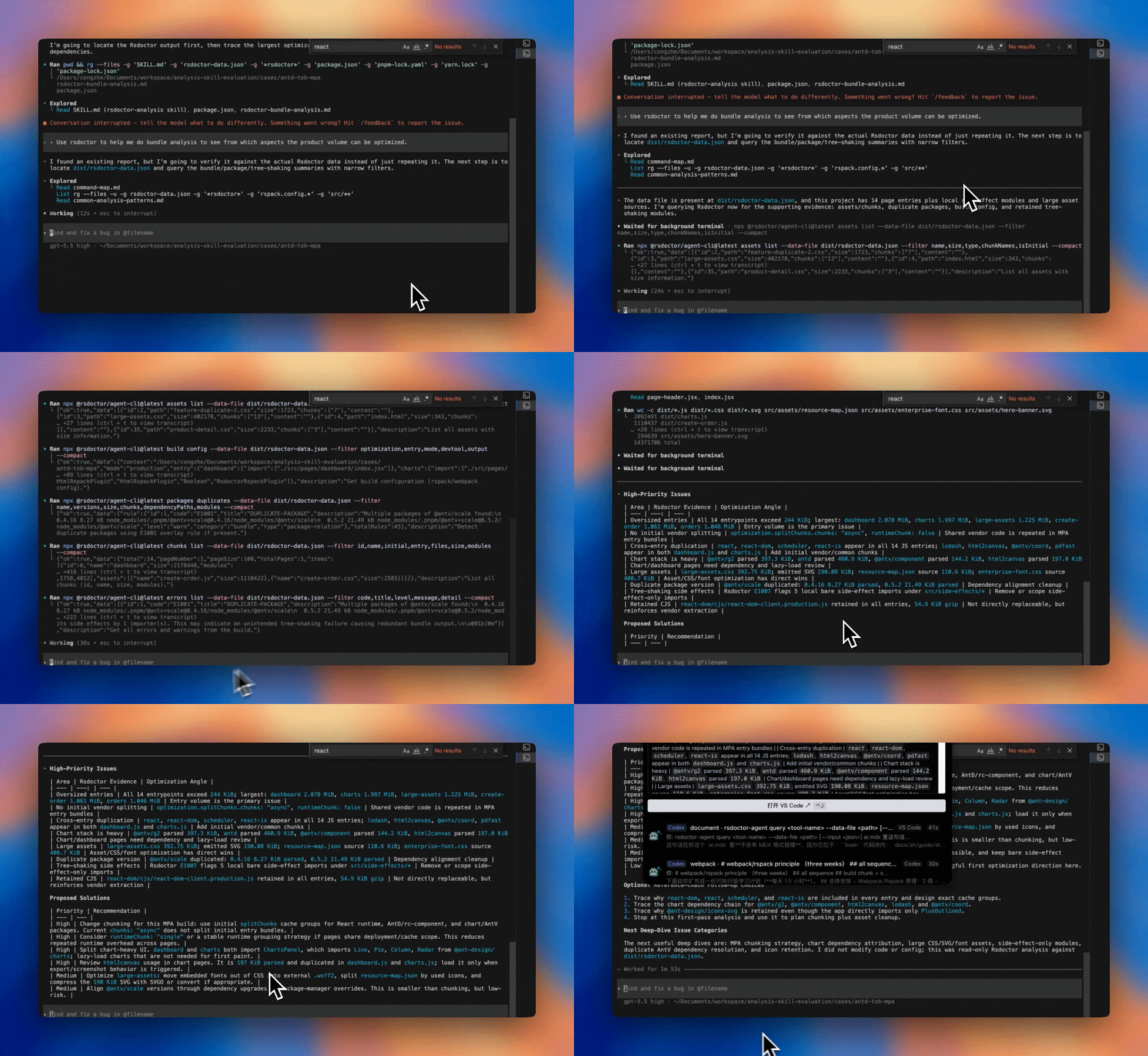
Rsdoctor 2.0 removes @rsdoctor/mcp-server and standardizes on Agent CLI, which runs on demand without maintaining a service connection. It is not MCP-compatible or a drop-in API replacement. See AI and the 2.0 migration guide for installation and migration details.
One report for every compiler
Modern Rspack applications often create several compilers in one process. A multi-compiler configuration may build browser and Node.js targets together, Rsbuild environments may create separate web and server builds, and plugins may start child compilers for generated assets.
Rsdoctor 2.0 makes the regular RsdoctorRspackPlugin the single entry point for these cases:
- Multi-compiler and Rsbuild environments: Group compilers created during the same startup and use environment names such as
webandnodeto distinguish their results. - Child compilers: Discover child compilers automatically and display their analysis data separately from the main compiler.
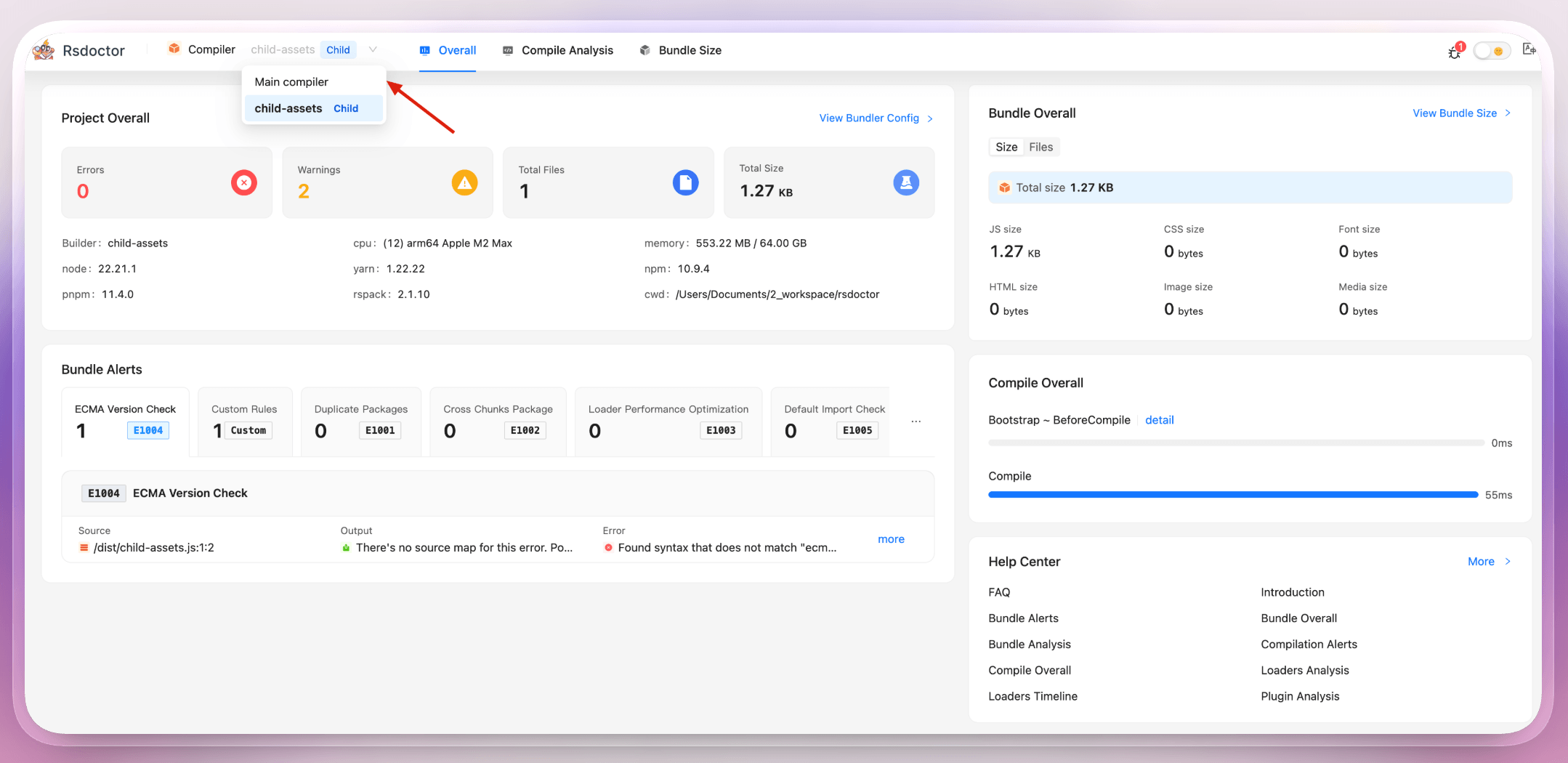
Automatic grouping is enabled by default and requires no new plugin. If one process starts unrelated compilers, set multiCompiler: false. A named group can also explicitly associate plugin instances:
Browser, server, worker, and plugin-generated builds can now be viewed from one report without switching to a dedicated multi-compiler plugin.
A smaller install footprint
A simpler package graph
Rsdoctor 2.0 consolidates core, graph, SDK, utilities, and the Rspack plugin into @rsdoctor/core, moves shared capabilities into @rsdoctor/shared, and keeps the client and CLIs as separate entry points:
This metric counts direct dependency declarations in the source, not installed packages. The dependency graph also includes the root package, transitive dependencies, and peer dependencies, so it contains more nodes.
Smaller install footprint
The streamlined package structure and runtime dependencies also cut the production installation footprint of @rsdoctor/core and its complete transitive dependency tree by nearly half:
When upgrading an Rspack project, replace @rsdoctor/rspack-plugin with @rsdoctor/core. See the 2.0 migration guide for the steps.
Faster rebuilds in watch mode
Rsdoctor 2.0 removes repeated work from the watch and HMR critical path in three ways:
- Reuse the SDK session and report server, and open the report page only for the first build.
- Preserve the bundler's loader cache and prevent loader events from accumulating across rebuilds.
- Skip module and asset gzip-size calculations. Non-watch builds retain the complete analysis path.
Watch mode writes report data with a faster compression level to reduce synchronous work on every update. As a trade-off, the compressed size of the main report shards increases by about 26%. This affects Rsdoctor report data only, not application bundle output. Non-watch builds continue to use the default compression level.
In the benchmark, median HMR time dropped from 6.81 s to 3.64 s, an improvement of about 47%. In a separate repeated-build benchmark, analysis time dropped from 250.9 ms to 14.2 ms, an improvement of 94.3%.
The benchmark disabled the Rsdoctor client server. The repeated-build benchmark used 100 modules, one warm-up, and the median of five runs.
Refined bundle analysis
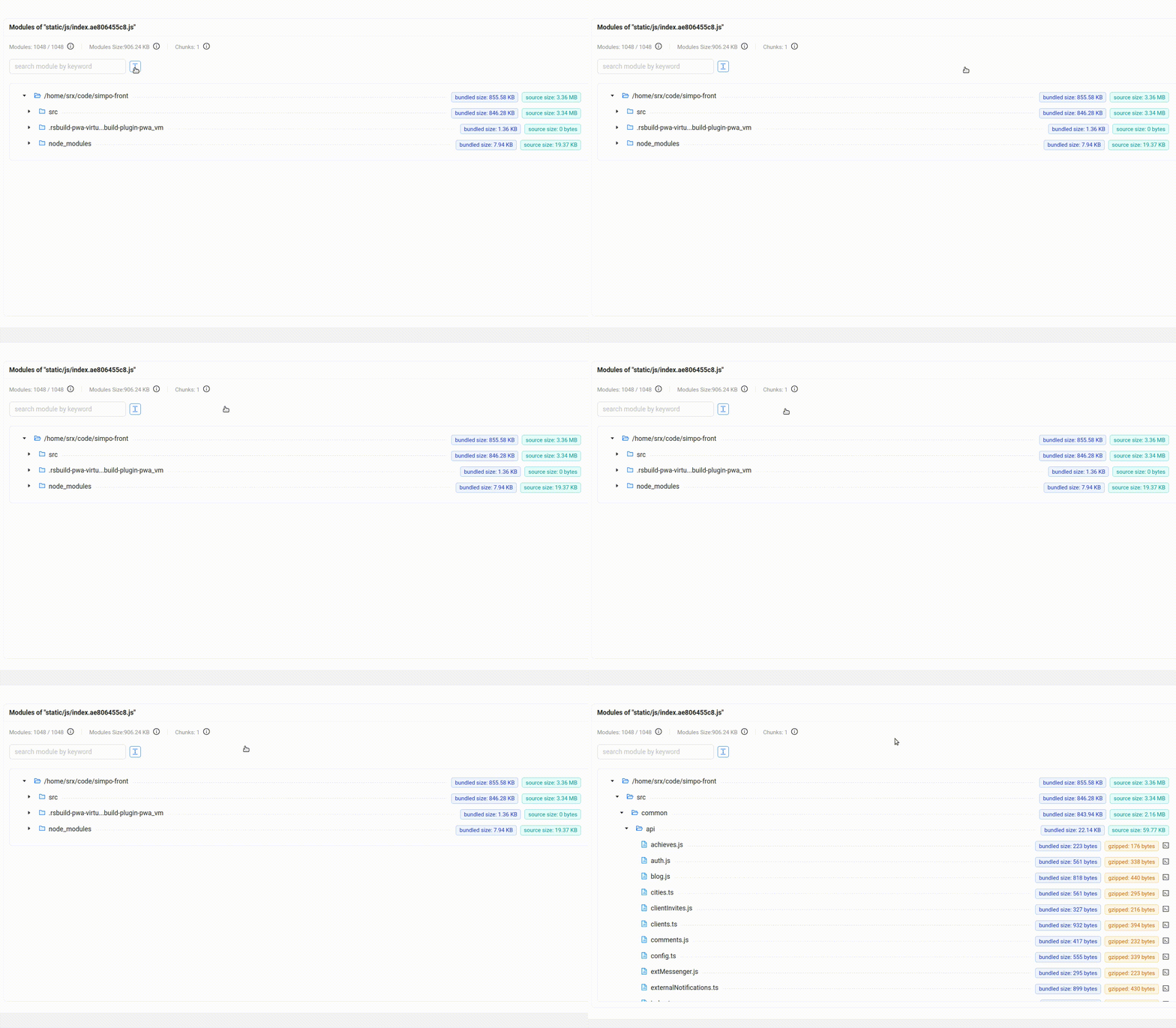
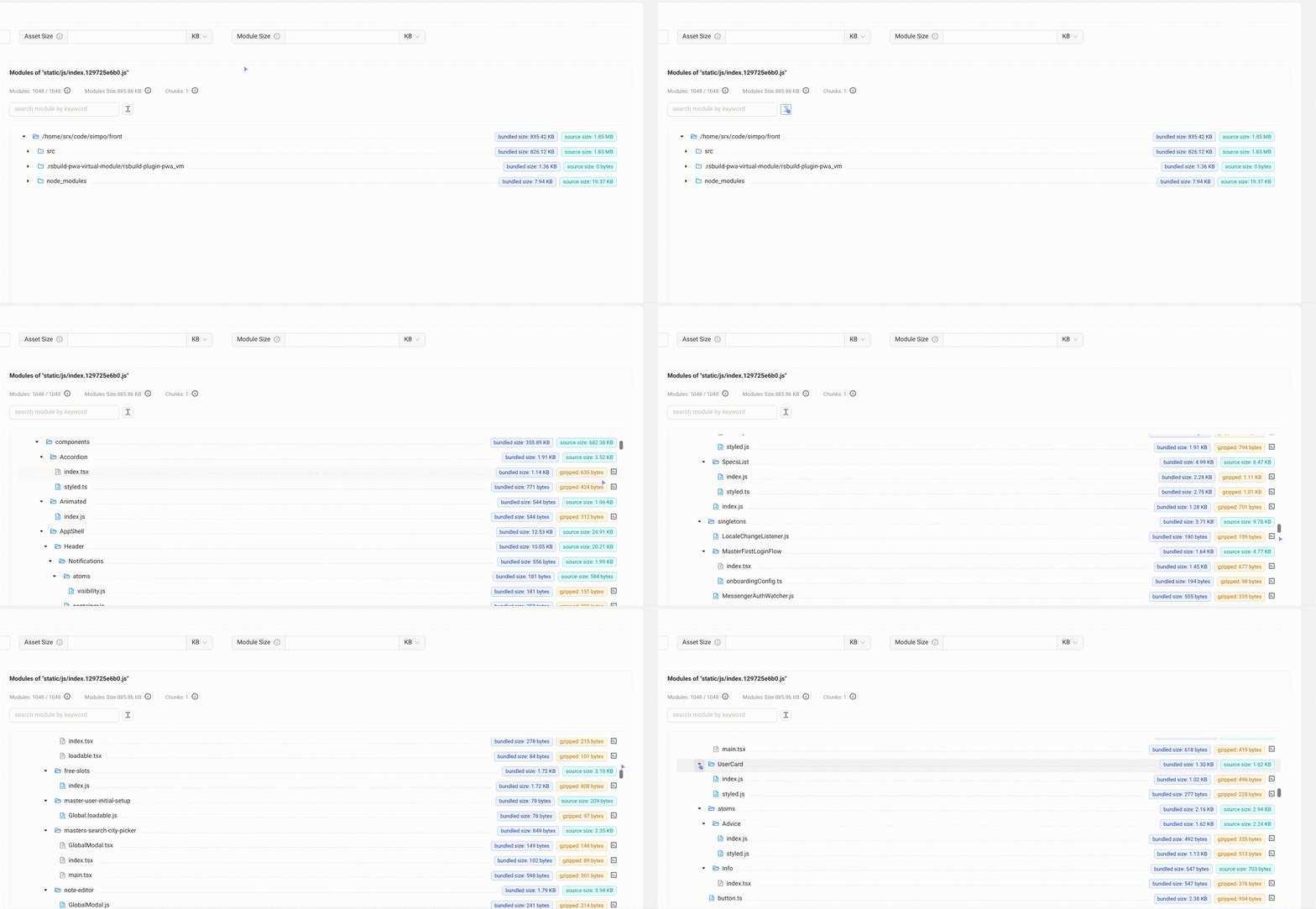
Large projects often produce assets with many deeply nested modules. Rsdoctor 2.0 improves both the rendering performance of the Bundle Size page and the analysis path from selecting assets and filtering chunks to locating modules and opening their details, making complex output easier to explore and understand.
- Tree Graph uses virtual scrolling and render caching to render only nodes near the viewport and reduce the overhead of interactive components such as tooltips and popovers while scrolling. Expanding folders and navigating large assets now remain responsive even when they contain many modules.
Before
After
Treemap adds full-screen mode, a collapsible sidebar, breadcrumb navigation, and click-to-zoom. Consistent Stat, Parsed, and Gzipped size metrics, JavaScript asset filtering, and responsive layouts make large outputs easier to explore.
Breaking changes
Rsdoctor 2.0 deliberately narrows its compatibility and package surface. Account for the following changes before upgrading:
- Runtime and bundler: Node.js 22.18 or later and Rspack 2.0 or later are required. Projects on Rspack 1.x must upgrade Rspack first. webpack projects should stay on the maintained Rsdoctor 1.x release line or migrate to Rspack.
- Packages and module format: Replace
@rsdoctor/rspack-pluginwith@rsdoctor/core. Rsdoctor packages are ESM-only, so CommonJSrequire()calls must become ESM imports. - AI workflow:
@rsdoctor/mcp-serverhas been removed. Migrate to@rsdoctor/agent-cli, which reads report data directly but is not an MCP-compatible or drop-in API replacement.
Configuration options
The following table distinguishes options that are removed from options that remain deprecated or supported:
See the configuration migration guide for complete examples.
Upgrade to 2.0
Rspack projects that meet the requirements above can start by replacing the 1.x plugin package:
To let a coding agent apply the migration, use the rsdoctor-migrate-v2 skill:
When using the CLI, keep @rsdoctor/cli and @rsdoctor/core on the same version. See the Rsdoctor 2.0 migration guide for the complete steps.
By focusing on Rspack, Rsdoctor 2.0 establishes a smaller foundation for visual and automated build analysis. We will continue expanding analysis across Rspack build scenarios and improving the data exposed to developers and agents so that build problems are easier to find, understand, and fix.
See the Release page for the complete list of changes.
Acknowledgements
Rsdoctor 2.0 was made possible by the wider community. Thank you to everyone who contributed code, tests, documentation, design, and reviews, as well as users who opened issues, shared reproducible projects, and tested prerelease versions. Your feedback and collaboration made Rsdoctor 2.0 more reliable and help us keep improving the build analysis experience ❤️